
Last updated on
Nov 6, 2026
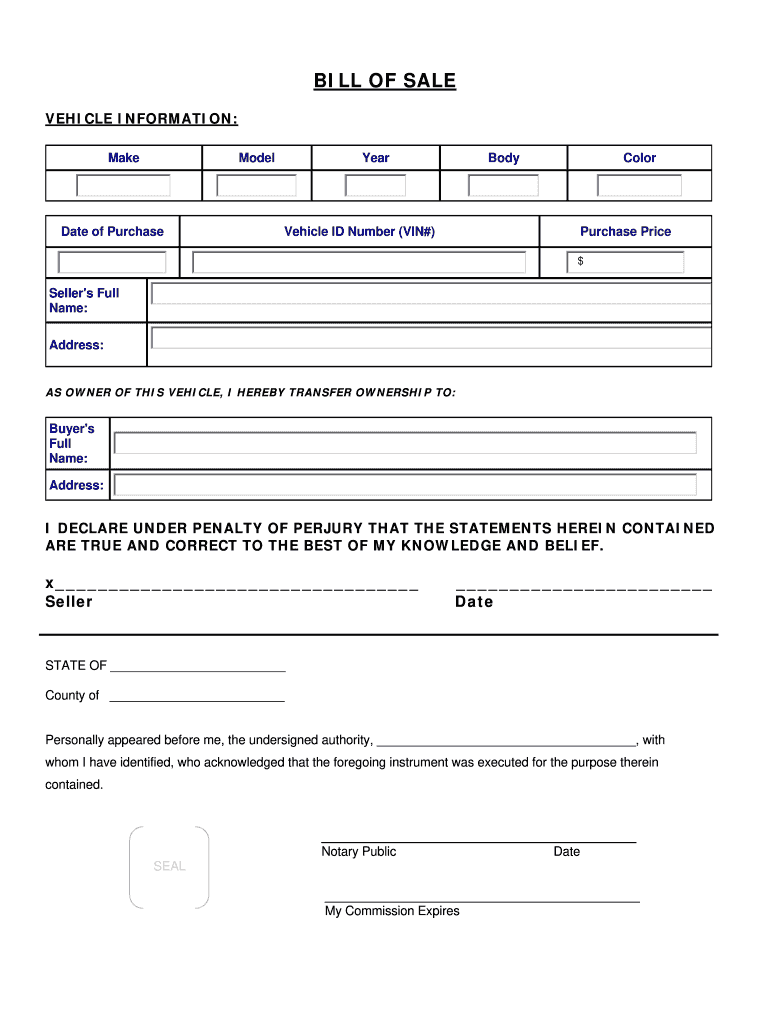
TN Bill of Sale - Cheatham County free printable template
pdfFiller is not affiliated with any government organization

Fill out
Complete the form online in a simple drag-and-drop editor.

eSign
Add your legally binding signature or send the form for signing.

Share
Share the form via a link, letting anyone fill it out from any device.

Export
Download, print, email, or move the form to your cloud storage.
Why pdfFiller is the best tool for your documents and forms


End-to-end document management
From editing and signing to collaboration and tracking, pdfFiller has everything you need to get your documents done quickly and efficiently.
Accessible from anywhere
pdfFiller is fully cloud-based. This means you can edit, sign, and share documents from anywhere using your computer, smartphone, or tablet.
Secure and compliant
pdfFiller lets you securely manage documents following global laws like ESIGN, CCPA, and GDPR. It's also HIPAA and SOC 2 compliant.
What is TN Bill of Sale - Cheatham County
The Vehicle Bill of Sale is a legal document used by sellers and buyers to facilitate the transfer of ownership of a vehicle.
pdfFiller scores top ratings on review platforms




Very user friendly, would highly recommend.
I love PDF Filler
I love PDF Filler. It took some getting used to but once I figured it, I cant function without it! No printing, no waiting for mail to show up. Turn any document into a PDF, fill it out, signature and all and go straight to Noterize for a 10 minute video Noterization followed by Fax in PDF Filler and ITS DONE! No printing, no scanning, no fax machine, no trip to the bank. and I can store ALL of my business docs safely to be emailed, noterized, faxed, sent by UPS, send to have someone else complete and return, share with multiple people...Even make make your own forms or turn an existing form into a template. Its future times... ACTUAL PAPERLESS SYSTEM! My only issue was the learning curve, It isn't exactly intuitive at first but it also doesn't take too many sessions to really figure it out.
Who needs TN Bill of Sale - Cheatham County?
Explore how professionals across industries use pdfFiller.

TN Bill of Sale - Cheatham County is needed by:
-
Individuals selling personal vehicles
-
Buyers purchasing used vehicles
-
Auto dealerships handling vehicle transactions
-
Notaries public witnessing signatures
-
Insurance companies processing claims
-
Title offices needing documentation for vehicle registration
Comprehensive Guide to TN Bill of Sale - Cheatham County
Understanding the Vehicle Bill of Sale
A Vehicle Bill of Sale is a crucial legal document that formalizes the transfer of ownership of a vehicle between the seller and the buyer. This document plays an essential role in vehicle transactions by protecting both parties and ensuring clarity in the ownership transfer process.
Legally, a Vehicle Bill of Sale serves as a record of the sale and includes vital information such as the vehicle's identification number (VIN) and the purchase price. The importance of having this document extends to potential legal implications that may arise if disputes occur in the future.
Purpose and Benefits of Using a Vehicle Bill of Sale
Utilizing a Vehicle Bill of Sale in vehicle transactions provides numerous advantages. Firstly, it establishes a legal record of the sale, which can be vital for both the buyer and the seller should any issues arise later on.
This document protects both parties by clearly outlining details such as the purchase price and vehicle specifications, minimizing misunderstandings. Additionally, the Vehicle Bill of Sale is beneficial in confirming the terms agreed upon during the transaction.
Key Features of the Vehicle Bill of Sale
The Vehicle Bill of Sale contains several essential components necessary for its validity. Key fields include the make, model, year, body color, VIN#, and purchase price, all of which must be accurately completed.
Furthermore, the signatures of both the seller and the notary public are crucial for legitimizing the document. This Bill of Sale acts as tangible proof of ownership transfer, which can be important for future reference or transactions.
Who Should Use a Vehicle Bill of Sale?
A Vehicle Bill of Sale is applicable to various individuals involved in vehicle transactions. Primarily, it serves sellers and buyers of used vehicles looking to establish formal agreements.
Moreover, individuals who are transferring ownership for reasons such as gifts or sales can benefit from this document. Its importance is evident in both private transactions and dealership sales, where having a formal record is essential.
How to Fill Out the Vehicle Bill of Sale Online (Step-by-Step)
Filling out a Vehicle Bill of Sale online can be straightforward when following these steps:
-
Begin by entering the make, model, year, and body color of the vehicle.
-
Include the VIN# and purchase price in the designated fields.
-
Complete the seller's and buyer's information, including full names and addresses.
-
Review all entries to ensure accuracy, avoiding common mistakes often made in transactions.
-
Follow the instructions provided for adding digital signatures and notarization.
Signing and Notarizing the Vehicle Bill of Sale
For a Vehicle Bill of Sale to be legally valid, it must be signed and notarized. Signatures from both the seller and the buyer are essential as they signify agreement to the terms outlined in the document.
The role of the Notary Public cannot be understated, as their acknowledgment of the signatures ensures the authenticity of the document. Depending on local laws, the requirements for digital signatures versus traditional 'wet' signatures may vary.
Where and How to Submit the Vehicle Bill of Sale
Proper submission of the Vehicle Bill of Sale is crucial to finalize the ownership transfer. Various methods exist for submitting the document, including online options and in-person submissions at local DMV offices.
Each state may have specific rules regarding the submission of the Vehicle Bill of Sale, including relevant fees, deadlines, and processing times. Being aware of these regulations helps ensure compliance with local laws.
Security and Compliance in Handling Your Vehicle Bill of Sale
When dealing with sensitive documents like the Vehicle Bill of Sale, security and compliance are paramount. Utilizing platforms with robust security measures, such as encryption and adherence to regulations, is essential.
Maintaining the privacy of personal information throughout this process is critical. pdfFiller employs industry-standard security practices to ensure that your documents are handled safely and securely.
Using pdfFiller to Complete Your Vehicle Bill of Sale
pdfFiller offers a range of features to streamline the process of completing your Vehicle Bill of Sale effectively. With capabilities such as editing, eSigning, and cloud storage, users can easily create and manage their documents with confidence.
Many satisfied users have shared success stories about how pdfFiller has simplified their document management, enhancing their overall experience during vehicle transactions.
Getting Started with pdfFiller
To begin using pdfFiller for your Vehicle Bill of Sale, start by signing up through their intuitive platform. The registration process is straightforward, setting you up to create your forms quickly.
Additionally, pdfFiller provides tutorial resources designed to assist new users. The platform emphasizes ease of use, ensuring that creating a Vehicle Bill of Sale is a smooth and efficient process.
How to fill out the TN Bill of Sale - Cheatham County
-
1.Begin by accessing the Vehicle Bill of Sale form on pdfFiller. You can search for the form in the pdfFiller app or directly upload it if you have a saved copy.
-
2.Once opened, navigate through the fields using the intuitive interface. Click on each field to enter the necessary details, such as the vehicle's make, model, year, body color, and the vehicle ID number (VIN#).
-
3.Before you start filling the form, gather detailed information about the vehicle including its purchase price, date of purchase, and both the seller's and buyer's full names and addresses.
-
4.Complete all required fields in the form, ensuring accuracy. Double-check the fields containing the seller's and buyer's information, as inaccuracies could lead to complications later.
-
5.After filling in the form, review all entries carefully. Ensure that all critical details are accurate and that signatures for both the seller and notary public are included.
-
6.Once you are satisfied with the filled form, click on the save option in pdfFiller. You can download the completed form for your records, or submit it electronically through the platform.
-
7.If needed, print a copy of the Vehicle Bill of Sale to provide physical copies to both parties involved in the transaction.

Who needs to sign the Vehicle Bill of Sale?
The Vehicle Bill of Sale must be signed by the seller and requires notarization by a Notary Public. Both signatures ensure the legality of the document.
What information is required to complete the form?
You will need detailed information about the vehicle, such as make, model, year, VIN#, purchase price, and information about both the seller and buyer, including their addresses.
Do I need to notarize the Vehicle Bill of Sale?
Yes, the Vehicle Bill of Sale requires notarization. This step ensures that the signatures are valid and the document holds legal weight in the transaction.
How do I submit the completed Vehicle Bill of Sale?
After completing the form, you can save and download it from pdfFiller. You can also submit it electronically if required by your local DMV or other agencies.
Are there any fees associated with this process?
While the Vehicle Bill of Sale itself does not have a fee, there may be notarization fees, and it's advisable to check with your local DMV for any related charges.
What common mistakes should I avoid when filling this form?
Common mistakes include incorrect VIN numbers, missing signatures, and falsifying information. Ensure all details are accurate and the form is complete before submission.
Is there a deadline for submitting the Vehicle Bill of Sale?
While there may not be a strict deadline for submission of the Bill of Sale, it's recommended to file it promptly to ensure the transfer of ownership is officially recorded, especially for vehicle registration.
Related Forms



Related Catalogs
Get the latest insights from our blog


If you believe that this page should be taken down, please follow our DMCA take down process
here
.
This form may include fields for payment information. Data entered in these fields is not covered by PCI DSS compliance.